
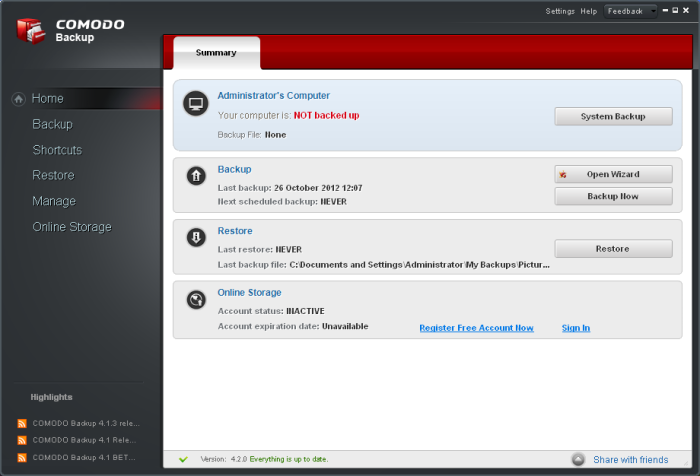
What is Comodo Backup?
Comodo Backup is a powerful backup and recovery solution designed to help individuals and organizations protect their valuable data. It provides a comprehensive set of features to ensure that your files, folders, and system settings are safely backed up and easily recoverable in case of data loss or system failure.
Main Features of Comodo Backup
Comodo Backup offers a range of features that make it an ideal solution for data protection. Some of its key features include:
- Automatic Backup Scheduling: Comodo Backup allows you to schedule automatic backups at regular intervals, ensuring that your data is always up-to-date and protected.
- Multiple Backup Options: You can choose to back up your data to local drives, network locations, or cloud storage services like Google Drive, Dropbox, and Amazon S3.
- File and Folder Backup: Comodo Backup allows you to select specific files and folders for backup, giving you control over what data is protected.
- System State Backup: You can also back up your system state, including registry settings, user profiles, and installed applications.
Why Backups Fail at Night: Common Issues and Solutions
While backups are essential for data protection, they can sometimes fail due to various reasons. Here are some common issues that may cause backups to fail at night:
Insufficient Disk Space
One common reason for backup failure is insufficient disk space. When the backup destination runs out of space, the backup process may fail or be incomplete.
Solution
To avoid this issue, ensure that the backup destination has sufficient free space. You can also consider using a larger storage device or configuring Comodo Backup to delete old backups to free up space.
Network Connectivity Issues
Network connectivity issues can also cause backups to fail. If the backup destination is a network location, a lost connection can interrupt the backup process.
Solution
To resolve this issue, ensure that the network connection is stable and reliable. You can also consider using a wired connection instead of Wi-Fi for better reliability.
Creating Air-Gapped Copies and Encrypted Repositories: A Step-by-Step Guide
Comodo Backup allows you to create air-gapped copies and encrypted repositories for added security. Here’s a step-by-step guide to creating these:
Creating an Air-Gapped Copy
An air-gapped copy is a backup that is stored on a separate device or location that is not connected to the network. This provides an additional layer of security against cyber threats.
Step-by-Step Instructions
To create an air-gapped copy using Comodo Backup:
- Launch Comodo Backup and select the backup job you want to create an air-gapped copy for.
- Click on the