
What is Bacula?
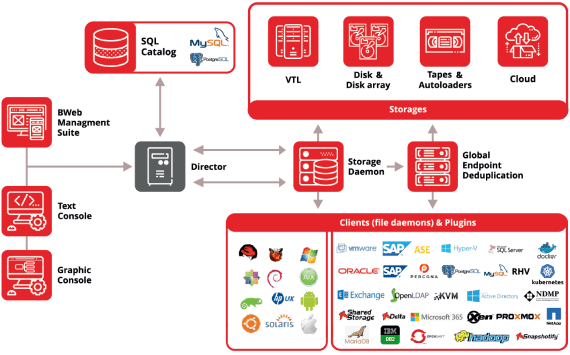
Bacula is a comprehensive, open-source backup and recovery software solution designed for data centers, enterprises, and organizations requiring high-level data protection. It offers a robust and scalable platform for backing up and restoring data across various environments, including virtual machines, databases, and file systems. Bacula’s architecture is centered around a director, which manages the backup and restore operations, and multiple storage daemons that handle data storage and retrieval.
Main Features
Bacula’s key features include automatic backup and restore operations, support for various storage devices, including tape drives, disk storage, and cloud storage, as well as advanced encryption and deduplication capabilities.
Benefits of Using Bacula
Some of the primary benefits of using Bacula include its ability to handle large-scale data centers, its flexibility and customizability, and its cost-effectiveness compared to proprietary backup solutions.
Installation Guide
Prerequisites
Before installing Bacula, ensure that your system meets the necessary prerequisites, including a compatible operating system, sufficient storage space, and the required dependencies.
Installation Steps
1. Download the Bacula installation package from the official website or a trusted mirror site.
- For Linux distributions, use the package manager to install Bacula.
- For Windows, use the installer executable to install Bacula.
Post-Installation Configuration
After installing Bacula, configure the director, storage daemons, and clients according to your specific requirements. This may involve editing configuration files, setting up database connections, and defining backup and restore jobs.
Technical Specifications
System Requirements
| Component | Requirement |
|---|---|
| Operating System | Linux, Windows, macOS |
| Storage Space | Dependent on backup data size |
| RAM | Minimum 2 GB |
Supported Storage Devices
Bacula supports a wide range of storage devices, including:
- Tape drives
- Disk storage (local and network-attached)
- Cloud storage (Amazon S3, Google Cloud Storage, etc.)
Pros and Cons
Advantages
Some of the primary advantages of using Bacula include:
- Highly customizable and flexible
- Supports a wide range of storage devices and environments
- Cost-effective compared to proprietary solutions
Disadvantages
Some potential drawbacks of using Bacula include:
- Steep learning curve due to complex configuration options
- Requires significant system resources
- May require additional dependencies or plugins for specific features
Best Practices for Bacula Disaster Recovery
Creating Snapshots
Regularly create snapshots of your critical data to ensure that you have a recoverable copy in case of data loss or corruption.
Testing Recovery Operations
Regularly test your recovery operations to ensure that your backups are complete and can be restored successfully.
Implementing Encryption and Deduplication
Use Bacula’s built-in encryption and deduplication features to secure your backups and reduce storage requirements.
FAQ
Q: Is Bacula free to download and use?
A: Yes, Bacula is open-source software and can be downloaded and used free of charge.
Q: What is the best alternative to Bacula?
A: Some popular alternatives to Bacula include Amanda, BackupPC, and Bareos.
Q: How do I restore from snapshots using Bacula?
A: Use the Bacula console or command-line interface to restore from snapshots. You can also use the Bacula GUI to simplify the restore process.