
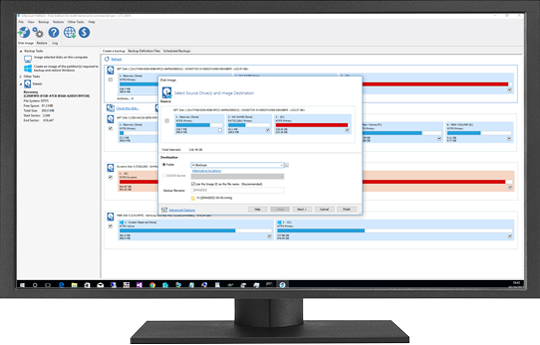
What is Macrium Reflect?
Macrium Reflect is a comprehensive backup and disaster recovery solution designed to protect businesses and individuals from data loss. It offers a wide range of features, including disk imaging, file backup, and incremental backup, to ensure that your critical data is safe and easily recoverable in the event of a disaster.
Main Features of Macrium Reflect
Some of the key features of Macrium Reflect include:
- Disk imaging: Macrium Reflect allows you to create an exact image of your hard drive, including the operating system, applications, and data.
- File backup: You can backup individual files and folders to a local or network location.
- Incremental backup: Macrium Reflect’s incremental backup feature allows you to backup only the changes made since the last backup, reducing storage requirements and backup times.
- Immutable storage: Macrium Reflect supports immutable storage, which ensures that your backups are tamper-proof and cannot be deleted or modified.
Understanding Incremental Backup with Macrium Reflect
What is Incremental Backup?
Incremental backup is a backup strategy that involves backing up only the changes made to your data since the last backup. This approach reduces storage requirements and backup times, making it an efficient way to protect your data.
How Does Incremental Backup Work with Macrium Reflect?
Macrium Reflect’s incremental backup feature works by creating a full backup of your data and then subsequent backups are incremental, only containing the changes made since the last backup. This ensures that you have a complete and up-to-date backup of your data while minimizing storage requirements.
Creating a Disaster Recovery Plan with Immutable Storage
What is Immutable Storage?
Immutable storage is a type of storage that ensures that data cannot be deleted or modified once it is written. This provides an additional layer of protection for your backups, ensuring that they are tamper-proof and can be used to recover your data in the event of a disaster.
How to Create a Disaster Recovery Plan with Macrium Reflect and Immutable Storage
To create a disaster recovery plan with Macrium Reflect and immutable storage, follow these steps:
- Install Macrium Reflect on your system.
- Create a backup of your data using Macrium Reflect’s disk imaging feature.
- Store the backup on immutable storage, such as a WORM (Write Once, Read Many) device.
- Test your backups regularly to ensure that they are complete and recoverable.
Downloading Macrium Reflect for Free
Is Macrium Reflect Free?
Macrium Reflect offers a free trial version that allows you to try out the software before purchasing. The free trial version has some limitations, but it gives you a good idea of the features and functionality of the software.
How to Download Macrium Reflect for Free
To download Macrium Reflect for free, follow these steps:
- Visit the Macrium Reflect website.
- Click on the